Creating Guidelines
CareFlow Kids supports internal clinical guideline creation.
Guidelines are structured logic rules that allow the system to analyze clinical information entered during a consultation.
They can be used to:
- interpret symptoms
- detect red flags
- match clinical criteria
- suggest investigations
- suggest differential diagnoses
Guidelines run locally inside the application and do not require AI or a connection to the internet.
How guideline matching works
During a consultation, the clinician enters information through the structured visit interface.
The system continuously evaluates this information against the configured guideline rules.
flowchart LR
    A[Structured clinical data entered in UI]
    B[Normalized clinical tokens<br>SNOMED concepts + structured keys]
    C[Guideline rule engine]
    D[Matched guideline flags]
    E[Clinical suggestions<br>or alerts]

    A --> B
    B --> C
    C --> D
    D --> E
The process works as follows:
- Clinical information is entered in the visit form.
- The system converts this information into normalized tokens.
- Guideline rules evaluate the tokens.
- When rule conditions match, a flag is generated.
- The flag can produce a clinical suggestion or alert.
Normalizing clinical information
To ensure reliable matching, CareFlow Kids uses SNOMED CT concepts alongside structured field keys.
This allows clinical findings to be represented in a standardized way.
Examples include:
- structured keys (for example
vital.temp_c.max) - symptom flags (for example
symptom.fever.present) - SNOMED CT identifiers (for example
sct:56018004)
Using standardized concepts ensures that guidelines remain robust and reusable.
Structure of a guideline rule
A guideline is defined as a set of logical conditions.
Each rule typically contains:
- a flag name (the label shown when the rule matches)
- a priority (importance level). When multiple rules match, higher priority values are evaluated and shown first.
- one or more conditions
Conditions may use logical operators such as:
- all (all conditions must match)
- any (at least one condition must match)
Example structure:
{
  "flag": "Febrile Child Red Flags",
  "priority": 95,
  "when": {
    "all": [
      {"key": "symptom.fever.present", "op": "present"},
      {"key": "vital.temp_c.max", "op": "gte", "value_number": 38}
    ]
  }
}
When the conditions are satisfied, the guideline rule produces a flag.
If several guideline rules match at the same time, the priority value determines which guideline is displayed first. Higher priority values indicate more important clinical rules, such as red‑flag conditions or urgent safety alerts.
Example priority levels:
- priority 95 → critical safety rule (for example sepsis or meningitis red flags)
- priority 50 → important guideline recommendation
- priority 10 → informational or supportive clinical flag
Using the guideline builder
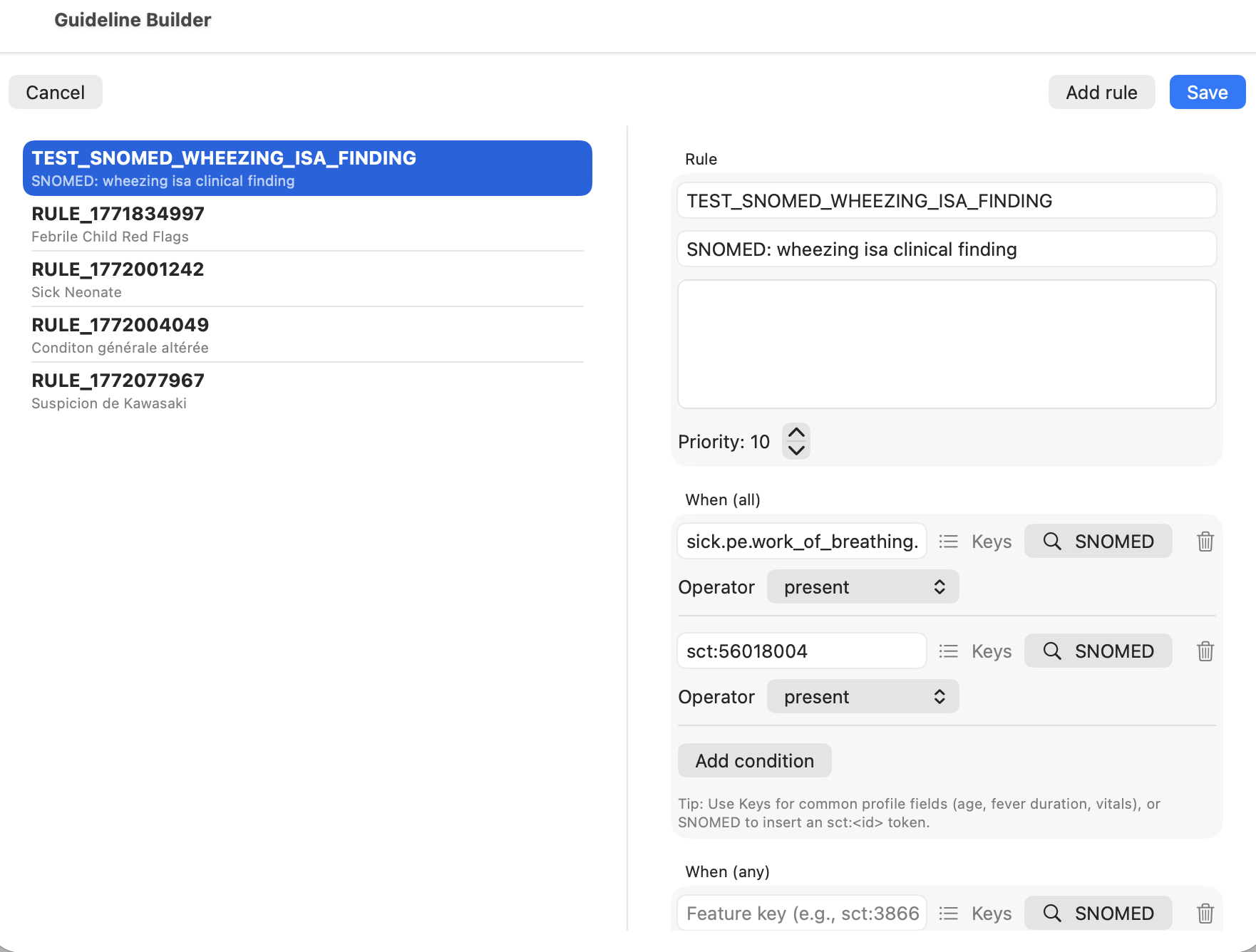
CareFlow Kids provides a visual guideline builder to simplify rule creation.
This interface allows the clinician to:
- create or edit guideline rules
- add logical conditions
- select standardized keys
- insert SNOMED CT concepts
- adjust rule priority
The visual builder automatically generates the corresponding JSON rule.
Exporting and sharing guidelines
Guideline rules are stored as JSON.
They can be:
- exported
- shared
- reused in other installations of CareFlow Kids
This makes it possible to build shared clinical rule libraries.
Relationship with AI
Guideline rules operate independently from the AI assistant.
They run locally and provide:
- guideline-based alerts
- clinical suggestions
- structured flags
These flags can then be used to inform AI analysis, but they do not require AI to function.
Screenshots
Screenshot (TODO)