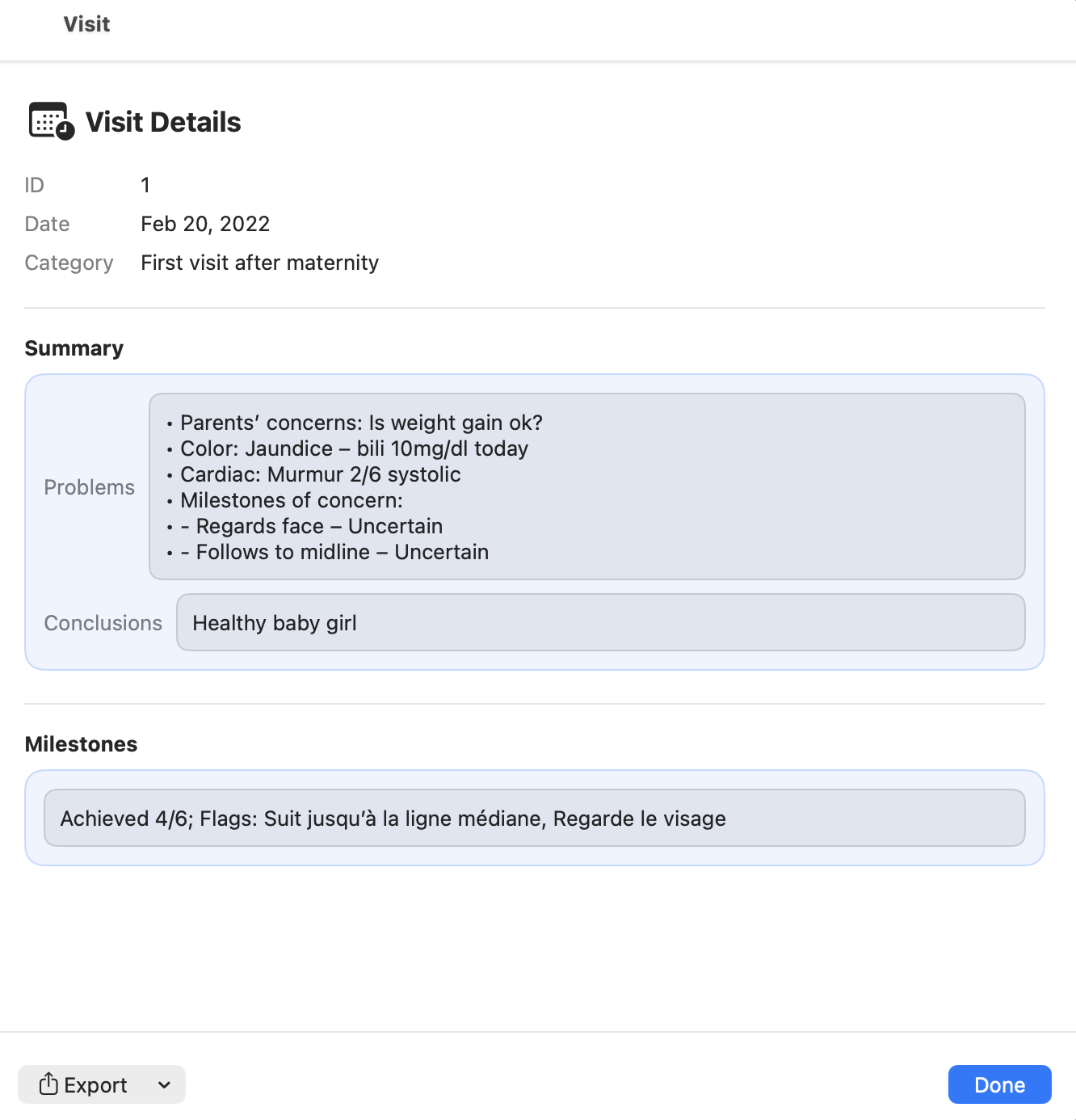
Well visit summary
The well visit summary presents a structured overview of the preventive consultation.
It gathers the key information recorded during the visit and prepares the data used to generate the visit report.
The summary helps the clinician quickly review:
- growth evaluation
- developmental milestones
- screening results
- preventive guidance
- follow‑up recommendations
Where to access the visit summary
The well visit summary can be accessed from the visit list.
- Open the patient's visit list.
- Locate the relevant well visit.
- Click the Details button.
This opens the visit summary view, where the clinician can review the structured information recorded during the visit.
From this screen it is also possible to:
- generate a PDF or DOCX report of the visit
- export or share the report when needed
What the summary includes
The well visit summary typically aggregates information from multiple sections of the visit:
Patient context
- age at visit
- visit type (1 month, 2 months, 4 months, etc.)
Growth evaluation
- latest measurements from the Growth Table
- growth chart positioning
- growth trend interpretation
Developmental milestones
- milestone items recorded during the visit
- flagged items that may require monitoring
Neurodevelopmental screening
When applicable, screening results such as M‑CHAT may be recorded and summarized.
These results help support early identification of developmental concerns.
Clinical observations
- feeding and nutrition
- sleep patterns
- parental concerns
- general examination findings
Preventive guidance
- anticipatory guidance
- safety advice
- follow‑up planning
Editing the visit summary
The summary is generated from the structured information recorded during the visit.
If adjustments are needed, the clinician should update the relevant sections of the visit form rather than editing the summary directly.
This ensures that:
- the clinical data remains consistent
- reports generated later reflect the corrected information
Generating the visit report
From the visit summary, the clinician can generate a well visit report.
Reports are produced on demand from the structured visit data and can be exported as:
- DOCX
Because reports are generated dynamically, they are not stored as static files inside the .pemr bundle.
This keeps patient bundles lightweight even when many visits are recorded.
Exporting the updated record
Once the well visit is complete, the clinician may export the updated .pemr bundle.
This allows the family to open the updated medical record in CareView Family.
The bundle contains:
- structured visit data
- growth history
- milestone records
- attached documents
Families can later return an updated .pemr bundle if new information or documents are added.