Importing a .pemr bundle
CareFlow Kids can import an existing .pemr bundle to restore or update a patient record.
Importing allows the clinic to receive updates from families using CareView Family and to continue working on the same cumulative portable medical record.
Typical use cases
Importing a .pemr is useful when:
- a family sends back an updated record with notes or documents
- a patient returns for a follow-up consultation with their existing bundle
- a previously exported patient file needs to be restored into the app
- another clinic using the same system shares the patient record
How to import a .pemr
- Open CareFlow Kids.
- Go to Patient management.
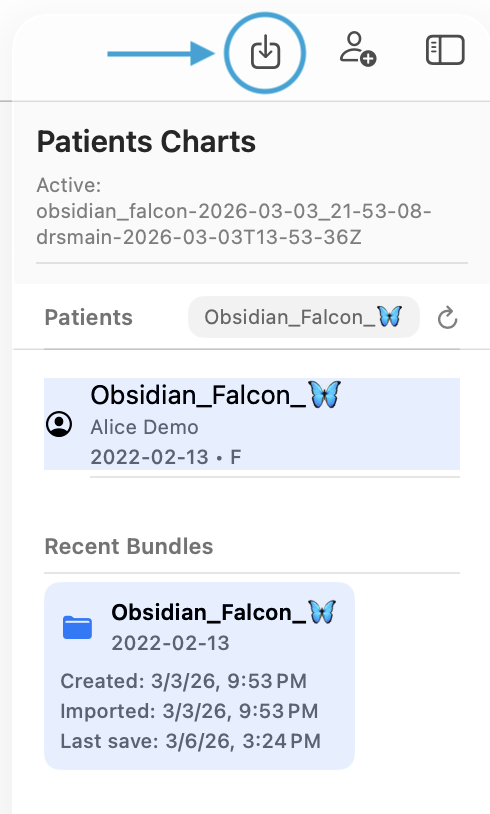
- Click the Import bundle button.
- Choose the
.pemrfile. - Confirm the import.
After import, the patient bundle becomes available in the app and appears in the sidebar / recent bundles list.
Screenshot
What happens during import
During import, CareFlow Kids will:
- read the bundle manifest
- verify the bundle format
- verify schema compatibility
- load the encrypted patient database
- attach the documents contained in the bundle
- restore the patient record into the app workspace
The imported bundle can then be opened normally for viewing, editing, and follow-up documentation.
Safety checks
The application verifies several elements before completing the import:
- bundle format
- schema version compatibility
- database integrity
- document integrity
If a problem is detected, the import stops and an error message is displayed.
After import
Once imported, the patient record becomes available in CareFlow Kids and can be used normally.
Typical next steps include:
- opening the patient record from the sidebar
- reviewing previous visits
- creating a new sick visit or well visit
- generating reports on demand
- exporting the updated
.pemrafter the consultation
Relationship with the .pemr loop
Import is one half of the portable patient record loop:
flowchart LR
    A[CareFlow Kids<br>Doctor consultation] --> B[Export .pemr]
    B --> C[Open in CareView Family]
    C --> D[Add notes / documents<br>View reports and charts]
    D --> E[Export updated .pemr]
    E --> F[Import into CareFlow Kids]
    F --> A
This loop allows the same patient record to circulate between the clinic and the family while remaining cumulative and portable.
Important note
Importing a .pemr restores the patient bundle into the application workspace, but the portable bundle itself remains the authoritative patient file.
After making changes in CareFlow Kids, clinicians should export the updated and parent import the updated .pemr so the portable record stays current.